
FOR ELECTED OFFICIALS & CANDIDATES
Public life, protected
Face Forward gives women and gender diverse elected officials and candidates free, real-time protection from online abuse — so you can stay visible, stay safe, and stay focused on the work that matters.
Supported by:


Already signed up? Jump to resources
What you get
Face Forward participants receive real-time protection and ongoing support for the full two years of the initiative—fully funded, at no cost.
Real-time protection from harmful content
Areto moderates comments on your public social media channels based on your chosen threshold, reducing the amount of harmful content you and your community sees.
A clear view of your supporters
Areto highlights positive engagement — the people backing you, encouraging you, and amplifying your work. During campaigns and in office, this helps you stay connected to the people who matter.
Support from the Face Forward team
Onboarding, guidance, and hands-on help throughout the project. You won't be navigating this alone.
A role in shaping global solutions
Your experience contributes to research that will influence policy, platform standards, and long-term practical protections for public leaders worldwide.
Not sure? Get in touch
ELIGIBILITY
Who can join
Face Forward is a non-partisan initiative, fully funded for all participants. There is no cost to join.
Who is eligible
Women and gender-diverse people
Current elected officials
Candidates for upcoming elections
At any level of government
Where Face Forward operates
Aotearoa New Zealand
Australia
Fiji
Tonga
Samoa
Solomon Islands

HOW IT WORKS
What to expect
Register
Fill out the registration form to confirm your interest and eligibility. It only takes a couple of minutes.
1
Receive your welcome email
You’ll get a confirmation email from Face Forward with everything you need to get started.
2
Create your Areto account
Set up your Areto account - this is where you’ll manage your protection settings and access more resources.
3
Go live
Connect your social media accounts and activate your protection. The Face Forward team will guide you through.
4
Not sure? Get in touch
THE PLATFORM
How Areto works
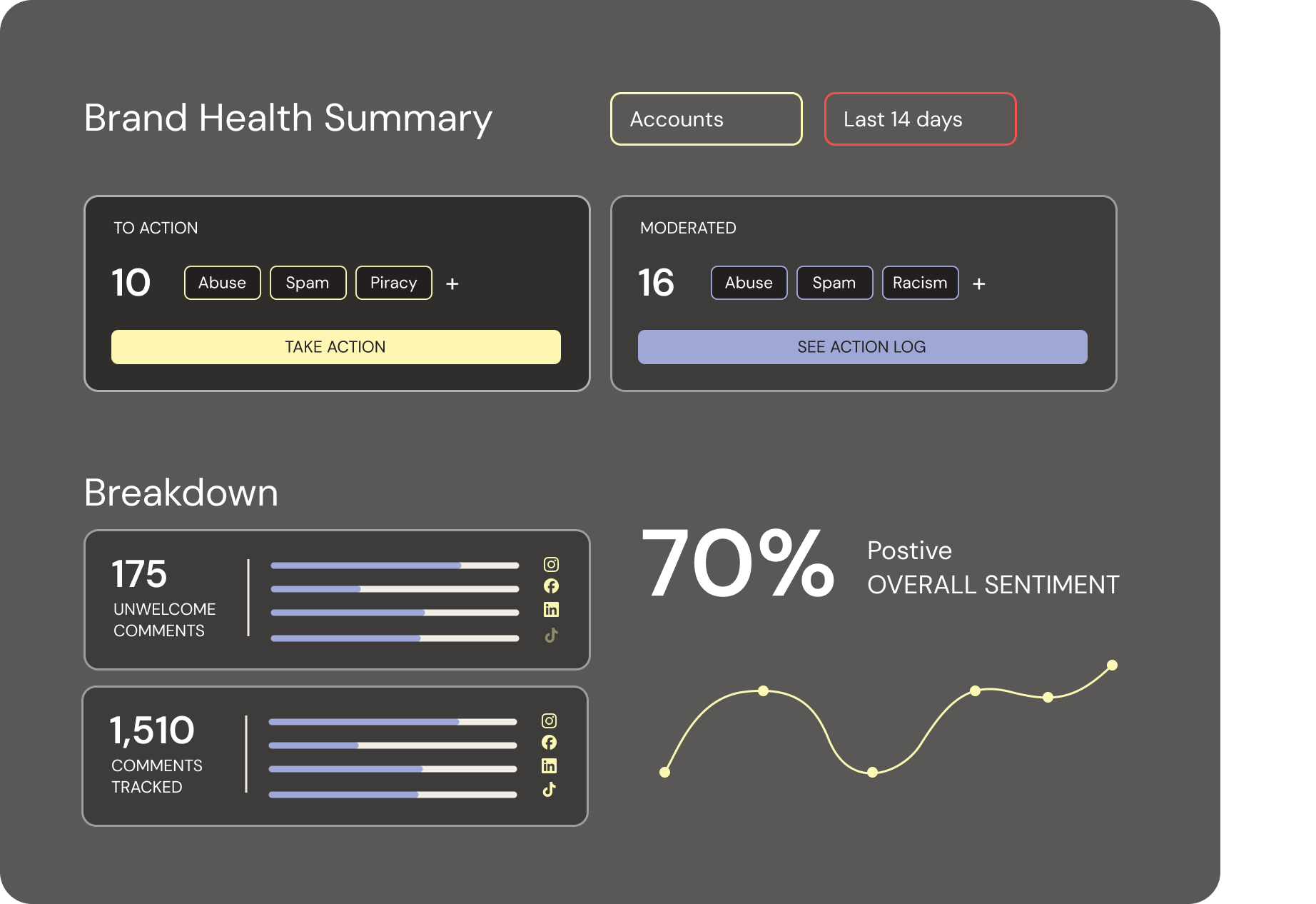
Areto combines AI with human oversight, giving you control to set community thresholds and define what’s acceptable online across your public social media. It supports responsible, transparent moderation that aligns with your community standards, helping you uphold public safety and maintain trust in your digital spaces.
We built Areto in one of the world’s top machine-learning labs to filter the noise and protect the people and work behind the world’s most important places, people and brands – so you can focus on what you came here to do: build a stronger, better community.
Areto’s first priority is to get online harm under control, creating safer social channels for your followers and less clean-up work for your team. Then, our advanced sentiment analysis, return on engagement data analytics and visualizations, and Fan Finder, will help you identify your most engaged supporters, track audience moods and trends, and turn insights into real engagement, stronger connections, and tangible impact.
-
Hide hate speech and abuse
Delete spam and bot traffic
Mute problematic accounts
-
Increase engagement
Identify superfans
See advanced sentiment trends
Understand platform and account trends and content performance
-
Track moderation performance
Build and share customized reports
FAQS
Common questions
About Face Forward
-
Face Forward is open to women and non-binary people who are currently elected officials or candidates for office at any level of government across Aotearoa New Zealand, Australia, Fiji, Tonga, Samoa, and the Solomon Islands. Participation is fully funded — there is no cost to join.
-
Once you register, you'll create an Areto account and connect your public social media channels. The Face Forward team will guide you through setup and be available throughout the programme. You'll also be asked to contribute to the research component — sharing your experience through anonymous surveys to help build better protections for leaders everywhere.
-
Face Forward is a two-year applied research initiative. Participants are supported for the full duration, with ongoing access to protection tools, the Face Forward team, and GIWL researchers.
-
Face Forward is a research initiative and your experience will contribute to anonymised findings. Your personal data is handled in accordance with applicable privacy laws. The Face Forward team can answer any specific questions about how your information is used.
-
Face Forward is a non-partisan, region-wide collaboration led by Areto and the Global Institute for Women's Leadership (GIWL) at the Australian National University, delivered with the support of ministries, local councils, political parties, and public institutions committed to safer democratic participation.
About Areto Software
-
Hides abusive comments
Deletes spam
Works automatically, 24/7
Removes all comment data within 30 days of deactivating Areto
-
Post content on your behalf
Read your DMs
Monitor your mentions
Scan comments on other people’s posts
Ask for or store your passwords
-
Areto works on public Facebook, Instagram, TikTok, YouTube accounts.
-
Yes, we do.
Ready to join?
Registration is free and open to eligible women and gender-diverse people in public life across the region.
Not sure? Get in touch
ALREADY SIGNED UP?
Everything you need to get started
Your next steps and guides are all below.
Create your Areto account
If you haven't already created your account, use the link in your welcome email to get set up. If you can't find it, get in touch and we'll resend it.
Connect your social accounts
Once you're in Areto, connect the social media accounts you want to protect. Most platforms are straightforward — see the notes below if you're connecting Facebook.
Before you connect your social accounts
Which platforms are you connecting to Areto? If you're connecting Facebook, check below before you start — a few quick steps can save a lot of troubleshooting later.
Facebook & Instagram
You'll need to check your Meta Business Suite set-up before connecting. Run through the steps below — skipping them is the most common reason authentication fails.
Instagram only
Only Instagram Professional accounts (Business or Creator) can connect to Areto.
If your Instagram is a personal account, you'll be prompted to switch to a Professional account during the authentication process.
If you're connecting Facebook and Instagram — check these first
Set up a Meta Business Suite portfolio
Go to business.facebook.comand log in with your Facebook account. Skip if you already have one.
Check you have Full access to the Business Portfolio
Settings → Users → People — your name must show Full access.
Your Name (You)
youremail@example.com
Other User
other@example.com
Add your Facebook Page to your Business Portfolio
Accounts → Pages. Skip if already added.
Add your Instagram account to your Business Portfolio
Accounts → Instagram accounts. If prompted to switch to a Professional account, do this now. Skip if already added.
Link your Facebook Page to your Instagram account
Instagram accounts → click your account → Connected assets tab → Connect assets. Skip if already linked.
1 asset is connected to this Instagram Account
You can connect assets or disconnect them.
Facebook Page
Your Facebook Page
Facebook Page
All done — head to Areto to connect your accounts
Follow the Areto authentication links to complete your setup.
Explore the platform
Once your accounts are connected, use the onboarding guide to get familiar with your dashboard — what's being filtered, how to review it, and how to make the most of the tool.
View onboarding guideNEED HELP?